Posted on January 19, 2008 in Biz Opp, Gadget, eBay by Tony LinNo Comments »

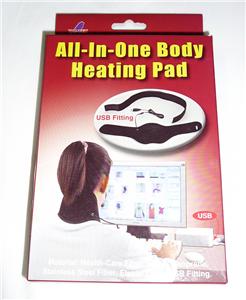
All-In-One USB Body Heating Pad. New! Holiday Special!

USB Heating Pad

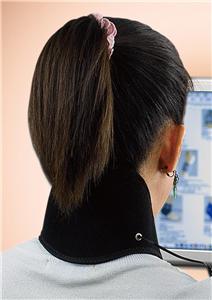
Use around your neck

Do you feel cold at work or in your home office? If you work with a computer in an air-conditioned space that you feel freezing all the time, the USB Heating Pad can help. 


With the USB heating pad, you can connect it to your computer’s USB port and instantly you have a heating pad to help you feel warmer. Once you plug it in the USB port, the pad warms up quickly.   Hold it in your palms to defrost your hands after coming in from the cold. Common uses of the heating pad are on the neck and wrist. With the included extender, you can apply it on your shoulder and waist.   You can also use it for your thigh, knee, and calf.  
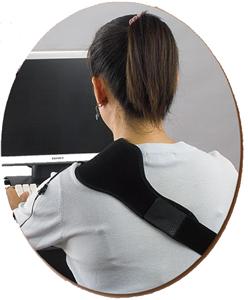
 

Around Shouder

The USB heating pad supports Windows and Macintosh and does a wonderful job keeping you warm and comfortable.  

Features:

·   Plug to your computer’s USB port.

·   De-frosting your hands by holding it.

·   Place on necks, shoulders, waists, thighs, knees, calfs, wrists.

·   Works with devices that have USB port, e.g. PC, Macintosh, game console like PlayStation or Xbox 360.

·   Patent pending.
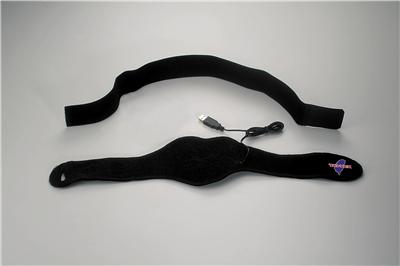
Parts Shown

To Order, Check out our eBay Store. Click Here.

Posted on December 2, 2007 in Knowhow, eBay by Tony LinNo Comments »

I found a nice place to download a few eBay tips.


Posted on December 1, 2007 in Web Store by Tony LinNo Comments »


Posted on November 29, 2007 in Gadget by Tony LinNo Comments »


New! All-In-One USB Heating Pad. Great Holiday Gift.


Do you feel cold at work or in your home office? If you work with a computer in an air-conditioned space that you feel freezing all the time, the USB Heating Pad can help. 
 
With the USB heating pad, you can connect it to your computer’s USB port and instantly you have a heating pad to help you feel warmer. Once you plug it in the USB port, the pad warms up quickly.   Hold it in your palms to defrost your hands after coming in from the cold. Common uses of the heating pad are on the neck and wrist. With the included extender, you can apply it on your shoulder and waist.   You can also use it for your thigh, knee, and calf.  
 
The USB heating pad supports Windows and Macintosh and does a wonderful job keeping you warm and comfortable.  
Features:
·   Plug to your computer’s USB port.
·   De-frosting your hands by holding it.
·   Place on necks, shoulders, waists, thighs, knees, calfs, wrists.
·   Works with devices that have USB port, e.g. PC, Macintosh, game console like PlayStation or Xbox 360.
·   Patent pending.
 
Package:
·   1 USB Heating Pad (black color standard. gray color available upon request)
·   1 extender (black color standard. white color available upon request )

Posted on November 27, 2007 in Gadget by Tony LinNo Comments »

This is a nice monitor at a great price.

Acer AL2216Wbd Black 22″ 5ms DVI Widescreen LCD Monitor with HDCP support 300 cd/m2 700:1 - $229.99 at Newegg.com

Acer AL2216Wbd Black 22″ 5ms DVI Widescreen LCD Monitor with HDCP support 300 cd/m2 700:1 - $229.99 at Newegg.com

Posted on November 21, 2007 in Gadget by Tony LinNo Comments »

I used Palm Pilot in the “old days.” The Palm III was a nice gadget — small, convenient, and geeky.  You can even beam business card to each other.  It was a male to male handshake.  And it was a status symbol.  Then, one day I decided to switch to HP Windows-based pocket PC for some kind of developer forward thinking reason, my life was never the same. Well, that is not a positive notion. This Windows based iPaq gadget was not really exciting. It was heavy and did not fit in man’s pocket.  In short, the gadget never sticked with me.  To these days it stays on the desk top for who knows how long.

At the same time I resisted this Mac things for years. Hey, they are cute, they are artistic. But in my heart I am supposed to be a Microsoft geek. If I get infected by this Macintosh bug, it could be bad for my career. Anyway, no way am I going to do anything with Apple.

When my Motorola Razer died, it was a mess. I don’t know how many phone numbers I lost.  I didn’t set up any 3rd party program to sync up with my Outlook.  So I went to the AT&T store to get a new phone.  There, people were lining up like bees, talking about iPhone.  I asked for brochures but there were none.  All they said was, “Go to Apple’s web site.” I guess that was when I got stung by Apple’s love bug.   To make the long story short, I bought an iPhone after touring the Apple store. (twice) I love all of the features except text chat.  The Contact list is so compatible with Outlook that it looks like they wrote the Outlook program.  The Google Map is handy; the Stock chart is nifty. The camera is okay but the pictures get sent right away.   The iPhone gets its connection from anywhere so I figure out more things to do.  Or more place to get online, i.e. bathroom.

The iPhone can get you a lot of attention.  It seems to bring back your friends.  It is like you holding a baby so others would come to look.  You have to get used to this woo and arr around you.  Ok. All this may have dimmed my Microsoft pride.  But I don’t care any more.    - Tony


iPhone 8GB

iPhone 8GB

iPhone 8GB

iPhone is Apple’s revolutionary new phone - a phone, a widescreen iPod, and a breakthrough internet device all in one.


Posted on November 16, 2007 in Biz Opp by Tony LinNo Comments »

Welcome to ApQc.com, A Pro’s Quality Choice.


Sell your item on eBay!